 NotePrivate
 / Hidden notes app
A hidden notes app, and what hiding a note really keeps out
A hidden notes app keeps a note out of sight when someone else is holding your open phone or sitting at your signed-in laptop. On an iPhone that means locking the note in Apple Notes, whose title stays visible, and hiding any downloaded notes app in the Hidden folder on iOS 18 or later. On a Galaxy phone, Samsung's Secure Folder can hide its own icon. Hiding is not the same as encryption, though. NotePrivate is a notes app for Mac and Windows that keeps every note, titles included, encrypted on your own disk, so a locked vault shows nothing at all. It is planned at $59 a year and on a waitlist today.
macOS and Windows today · Planned $59 a year · Waitlist only · Apple and Samsung details read from their support pages, November 2026
Key facts about hidden notes apps
- iPhone can hide downloaded apps in iOS 18 and later; Apple Notes itself cannot be hidden.
- Since iOS 16, Apple Notes can lock notes with the iPhone passcode, but titles stay visible.
- Secret Notepad - Private Diary on Google Play has 1M+ downloads and advertises recovery support without explaining how it works.
- NotePrivate locks after 10 idle minutes by default and is planned at $59 a year.
- These hidden notes app facts were checked on Apple, Samsung and Google Play pages in November 2026.
Bottom line: which hidden notes app to use
- Use Apple Notes lock plus the iPhone Hidden folder if you write on an iPhone. Both cost $0. A locked note's title stays visible, and a hidden downloaded app's name can still appear in Screen Time, Battery and App Store purchase history.
- Use Samsung Secure Folder if you write on a Galaxy phone. It is free, its icon can disappear from the Apps screen, and you can move a notes app into it.
- Use NotePrivate if the notes live on a Mac or Windows PC. A locked NotePrivate vault shows no titles at all, planned at $59 a year, waitlist only.
What a hidden notes app can mean: a hidden icon, a hidden note, or a sealed note
People who search for a hidden notes app usually want one of three things, and the app stores mix them together. NotePrivate sorts them by who they stop.
A hidden app. The notes app itself vanishes from the home screen, so a person scrolling your phone never sees that it exists. The iPhone Hidden folder and a hidden Samsung Secure Folder both do this. They stop a casual look. They do not change how the notes inside are stored.
A hidden note. The app stays in view, and one note inside it needs Face ID, a fingerprint or a password before it opens. Apple Notes and Samsung Notes both lock single notes this way. In Apple Notes the title of a locked note stays in the list, so choose the title with that in mind.
A sealed note. The note is encrypted with a key only you hold, so even a copy of the app's files, or a backup of them, cannot be read without your password. NotePrivate does this for its whole vault on a Mac or Windows PC, titles included, and a forgotten password cannot be reset.
Most people want a mix: nothing obvious on screen and nothing readable in a copy. The NotePrivate vault password and single-note lock page explains how those two layers work together on a computer.
What each hidden notes method still shows, from the iPhone Hidden folder to a NotePrivate vault
The test that matters for a hidden notes app is simple: hand your open device to someone and ask what they can still see.
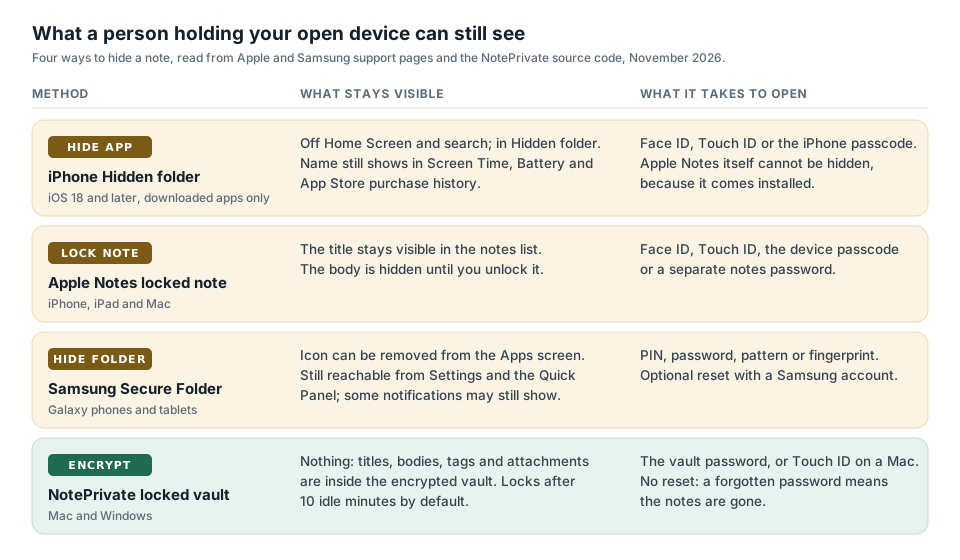
How to hide notes on iPhone, and what Apple Notes still shows
The iPhone gives you two hidden notes tools, and neither is a separate app you install. NotePrivate has no iPhone app yet, so on the phone these two are the answer.
Lock the note in Apple Notes. Open the note, tap More, then Lock. Since iOS 16 you can use the iPhone passcode or a separate notes password, and Apple says both keep locked notes end-to-end encrypted for iCloud accounts. Apple's iPhone guide is plain about the catch: when a note is locked, the title remains visible in the notes list. A locked note also stays open for several minutes after you open it, until you close Notes or the phone sleeps. Apple will not lock notes with tags, PDFs, audio, video or iWork files, Quick Notes, notes synced through Gmail or Yahoo, or shared notes.
Hide a downloaded notes app. On iOS 18 and later, touch and hold an app, tap Require Face ID, then Hide and Require Face ID. Apple says the app disappears from the Home Screen and search results and moves to the Hidden folder at the bottom of App Library, which needs Face ID, Touch ID or the passcode to open. Two limits: apps that come installed, Apple Notes among them, cannot be hidden, and Apple lists places where a hidden app's name can still appear, including Settings, Screen Time, Battery and App Store purchase history.
If the person you are hiding notes from shares your Apple Account or your passcode, neither tool helps much. Apple also says a hidden app is hidden only on that iPhone; the setting does not sync through iCloud.
How to hide notes on Android and Samsung Galaxy phones
On a Galaxy phone, the hidden notes tool Samsung ships is Secure Folder. Samsung's UK support page says Secure Folder is protected by the Samsung Knox platform, which encrypts the data stored there, and you can download apps straight into it or move a copy of an app in. Samsung says an app you move into Secure Folder becomes a separate copy, apart from the one on your normal Apps screen.
Samsung's US support page explains how to hide it: tap Secure Folder in the Quick Settings panel, or turn off Add Secure Folder to Apps screen in Settings, Security and privacy, More security settings. You can also rename it and change its icon. The limits Samsung lists: a hidden Secure Folder is still reachable from Settings and the Quick Panel, a Notifications setting can let apps inside show notifications while the folder is locked, and a Reset with Samsung account option can open the folder if you forget its PIN or pattern.
On other Android phones, the Play Store fills the gap with locker apps such as Secret Notepad - Private Diary, covered in the next section. NotePrivate has no Android app. The NotePrivate password protected notes apps ranked by what the lock covers shows which Android options lock a single note, including Notesnook's free private vault.
Secret notepad and locker apps: what to check before you hide notes in one
Google Play lists Secret Notepad - Private Diary by Aegean Izel at 4.1 stars and over 1 million downloads in November 2026. The listing describes a text password, a pattern or fingerprint access, and lists ads with in-app purchases. It says notes stay on the phone and are never sent to a server, yet it also advertises optional Google Drive backup and restore, so notes leave the phone if you turn that on. It does not describe how notes are encrypted at rest, on the phone or in that backup.
The listing advertises recovery support if you forget your password, but does not explain the recovery method. Ask the developer how recovery works and what protects the stored notes before trusting the app with sensitive information. Apple says it cannot help you open notes locked with a forgotten separate notes password. A NotePrivate vault also has no password reset.
Three questions help assess a locker app. Does the developer explain how the notes are encrypted, beyond a PIN screen? How does password recovery work? What does the privacy label say about collection and tracking? The NotePrivate private notepad checks for phones and computers page turns those into a five minute test you can run yourself.
Privnote and self-destructing notes: hidden from everyone after one read
Some people searching for a hidden notes app want to send a note, not keep one. Privnote does exactly that: you write a note in the browser, Privnote encrypts it and gives you a link, and the note self-destructs after the recipient reads it. Its options add a manual password, an expiration date and an email when the note is destroyed.
That is the right tool for passing a code to one person once. It is the wrong tool for a note you want to read again tomorrow, because by design there is nothing left to read. NotePrivate covers the keeping side: notes that stay on your Mac or Windows PC and stay encrypted for as long as you keep them. Its Send secure copy option seals one note under its own passphrase, and the NotePrivate guide to what Evernote, Apple Notes and OneNote encrypt inside a note sets that next to the other in-note locks.
How to hide notes on a Mac or Windows PC with NotePrivate
On a computer, hiding a notes file is the weakest option you have. A hidden file on Windows comes back with one File Explorer setting, View, Show, Hidden items, and a Mac's hidden files return with a keyboard shortcut in Finder. Hiding the folder keeps out nobody who knows to look, and FileVault or BitLocker stop protecting your files once you have signed in. The NotePrivate notes app for Windows that keeps notes encrypted on your PC covers what BitLocker, EFS and Notepad do and do not protect.
NotePrivate is the hidden notes app for a Mac or Windows PC because it does not rely on hiding. Every note, title, tag and attachment sits inside an encrypted vault on your disk: Argon2id turns your password into a 256-bit key that wraps the master key, and XChaCha20-Poly1305 encrypts the vault. While the vault is locked, the window shows nothing but the password prompt.
Inside an open vault, you can mark a note as protected. Its title stays in the list with a lock icon and the preview reads "Protected note" until you enter the vault password again, and search matches only its title, much as Apple Notes keeps a locked note's title in its list. The vault locks itself after 10 idle minutes by default, adjustable from 1 minute to 1 hour, and a setting that is on by default locks it when the app loses focus or the machine wakes from sleep. On a Mac, Touch ID can open the vault.
Worked example: hide a note on an iPhone in about two minutes
This is the free hidden notes setup on an iPhone running iOS 18 or later, using only Apple's own tools. NotePrivate has no iPhone app yet, so this is what NotePrivate would tell a phone-only reader to do today.
- Pick the lock. Open Settings, tap Apps, Notes, then Password, and choose Use iPhone Passcode, available since iOS 16, or Create Password for a separate notes password with a hint.
- Give the note a dull title. Locked notes keep their title in the list, so a first line like "Parking 3B" gives away nothing, while "Bank PIN 4471" gives away everything.
- Lock it. Open the note, tap More, then Lock. It locks again when you close Notes or the phone sleeps; after you open it, locked notes stay open for several minutes.
- Hide any second notes app. If you also keep notes in a downloaded app, touch and hold its icon, tap Require Face ID, then Hide and Require Face ID. It moves to the Hidden folder at the bottom of App Library, out of search.
- Check what still shows. Swipe through Settings, Screen Time and Battery: Apple says a hidden app's name can still appear there, so decide whether that matters for the person you are hiding notes from.
Steps from Apple's support article on locking notes on iPhone or iPad and its "Lock or hide an app on iPhone" guide, read November 2026. The note title and number in step 2 are made-up examples.
Why a hidden notes app is not always a private one, and where NotePrivate differs
Two questions separate a hidden notes app from a private one. NotePrivate answers both the same way.
Out of sight on the screen
A hidden icon or a locked note stops someone scrolling your open phone. It says nothing about the file underneath, a backup of it, or the person who knows your passcode. Apple says an iPhone hidden app's name can still appear in Screen Time and App Store purchase history.
Unreadable without your key
An encrypted note is ciphertext in every copy, including a backup or a synced folder. The test is whether anyone can reset your password and still show you the notes. With NotePrivate nobody can: the password wraps the master key on your Mac or PC and never leaves it.
Comparing apps on who holds the key rather than how well they hide? The NotePrivate secure notes apps compared on who can read them page runs seven apps through the same tests.
Who NotePrivate is not for
NotePrivate wrote this hidden notes app guide, so here is where NotePrivate loses, and what to use instead.
You only write on a phone
NotePrivate runs on macOS and Windows; the iPhone companion is still in progress and there is no Android app. Use Apple Notes lock on an iPhone, or Secure Folder on a Galaxy phone.
Your budget is $0
NotePrivate is planned at $59 a year with no free tier. Apple Notes lock, the iPhone Hidden folder and Samsung Secure Folder all cost nothing on the phone you own.
You want a note to vanish after one read
NotePrivate keeps notes for as long as you want them. For a note that should self-destruct once someone opens it, Privnote is built for that.
A NotePrivate password you forget cannot be recovered
The NotePrivate vault password wraps the master key, the key never exists on a server, and there is no reset link. That is the price of a hidden notes app nobody else can open, including the people who make it. Store the password in a password manager before you write anything you would hate to lose, and on a Mac turn on Touch ID so a long password stays practical.
Questions about hidden notes apps and NotePrivate
What is the best hidden notes app?
It depends on the device. On an iPhone, Apple Notes lock plus the Hidden folder in iOS 18 is free and already installed. On a Galaxy phone, Samsung Secure Folder can hide its own icon. On a Mac or Windows PC, NotePrivate keeps every note, titles included, in an encrypted vault on your disk, planned at $59 a year and waitlist only.
How do I hide notes on my iPhone?
Lock the note in Apple Notes: open it, tap More, then Lock, and use your iPhone passcode or a notes password. Apple says the title of a locked note stays visible in the list. To hide a downloaded notes app, touch and hold it, tap Require Face ID, then Hide and Require Face ID; Apple Notes itself cannot be hidden.
Can you hide the Notes app on iPhone?
No. Apple says apps that come installed with the iPhone cannot be hidden, and Apple Notes is one of them. You can lock single notes inside it, or hide a notes app you downloaded from the App Store in the Hidden folder at the bottom of App Library.
How do I hide notes on Android?
On a Samsung Galaxy phone, move your notes app into Secure Folder and turn off Add Secure Folder to Apps screen, or lock single notes in Samsung Notes. On other Android phones, a locker app from Google Play or Notesnook's free private vault are the usual routes. NotePrivate has no Android app.
Is a hidden note the same as an encrypted note?
No. Hiding keeps a note off the screen, while encryption makes every copy of it unreadable without your key. A good sign of real encryption is that nobody can reset your password and still show you the notes. NotePrivate encrypts the whole vault on your Mac or Windows PC and has no password reset.
Are secret notepad apps from the Play Store safe?
Some can keep a note away from a glance, but read the listing first. Secret Notepad - Private Diary has over 1 million downloads and advertises recovery support without explaining how it works. Ask the developer how notes are stored and recovered before relying on the app for sensitive information.
How do I hide notes on a Mac or Windows PC?
Hiding the file is weak, because Windows shows hidden files with one File Explorer setting and a Mac shows them with a Finder shortcut. Use a notes app that encrypts instead. NotePrivate keeps every note encrypted on your Mac or PC, locks after 10 idle minutes by default, and can keep a single note closed after the vault is open.
Is NotePrivate on sale yet?
No. NotePrivate is waitlist only, planned at $59 a year with every feature included, on macOS and Windows. Join the waitlist and we will email you when it opens.
Keeping dated entries rather than notes? The encrypted journal apps with a lock, compared covers diaries, and the Apple Notes alternatives for Mac and Windows page covers leaving Apple Notes.
What changed on this page
- November 2026: first published, with Apple, Samsung, Google Play and Privnote pages read 3 November 2026.
- 10 November 2026: rechecked against Apple, Samsung and Google Play; clarified where a hidden iPhone app goes, and noted Secret Notepad's optional Google Drive backup.