NotePrivate / Best password protected notes app
The best password protected notes app is the one whose lock still works when someone else is holding your open phone or sitting at your signed-in laptop, and whose password encrypts the note instead of just hiding it. On that test, Notesnook is the best free pick on every device, Apple Notes and Samsung Notes are the locks already on your phone, and NotePrivate is the pick for a Mac or Windows PC where every note sits encrypted on your own disk. NotePrivate wrote this comparison and is one of the eight apps in it.
Vendor details read from each vendor's own pages, 29 September to 26 October 2026 · Named products are market context, not endorsements
Search for a password protected notes app and you get three different products in one list. NotePrivate sorts them by what a person holding your device, or a copy of your files, can still read.
Your phone passcode, your Mac or Windows login, FileVault and BitLocker are real protections too, but none of them is a password on a note once you are signed in. The NotePrivate page on a notes app with a password for Mac and Windows goes through those four locks one by one.
Eight notes apps people weigh when a password is the reason they are shopping, NotePrivate included. The fourth column answers one question: with the lock in place, who else could read your notes?
| App | What the password locks | Ways to open it | Who else can read your notes | Platforms | Price |
|---|---|---|---|---|---|
| NotePrivate | Whole vaultPlus an extra lock on single notes | Vault password; Touch ID on Mac | Nobody else: the vault is encrypted on your disk and the password never leaves the device | macOS, Windows | $59/year planned, not on sale |
| Notesnook | Single notesPrivate vault on Free; whole-app lock on Pro | Vault password; fingerprint or face on mobile; Pro app lock by PIN, password, biometrics or security key | Nobody else: end-to-end encrypted on free and paid plans | Windows, macOS, Linux, Android, iOS, web | Free; Essential $19.99/yr; Pro $69.99/yr |
| Standard Notes | Single notesListed on the free plan | Account password; optional Application Passcode | Nobody else: end-to-end encrypted by default | Web, desktop, mobile | Free; Productivity $90/yr; Professional $120/yr |
| Apple Notes | Single notesNot notes with tags, PDFs, audio, video, iWork files, IMAP sync, or shared notes | Notes password, Face ID or Touch ID | Apple, for notes you have not locked, unless Advanced Data Protection is on | iPhone, iPad, Mac; iCloud.com in a browser | Free with an Apple device |
| Samsung Notes | Single notesNeeds a Samsung account | Note password; fingerprint per Samsung's community guides | Not stated in Samsung's lock instructions | Samsung Galaxy devices; Windows on Galaxy Book PCs | Free on Galaxy devices |
| Bear | Single notesNote Password and app lock on Bear Pro | Note Password; app lock | Only you for Note Password notes; titles and tags sync unencrypted | iPhone, iPad, Mac; Bear Web beta does not support encrypted notes | Free without sync; Bear Pro $29.99/yr |
| OneNote | Whole sectionsNot a single note | Section password | Microsoft stores the notebook in OneDrive; protected sections are encrypted with your section password | Windows, Mac, phones, web | Free |
| Google Keep | NothingNo note lock | Your Google account only | Google holds the keys | Android, iPhone, web | Free |
Sources for this password protected notes app table: notesnook.com/pricing and the Notesnook help pages on the private vault and Pro app lock, read 26 October 2026; standardnotes.com/plans, read 26 October 2026; Apple's iCloud data security overview and lock guide, read 26 October 2026; Samsung's "Use Samsung Notes features and settings" support page and Galaxy Book guide, read 26 October 2026; Bear's FAQ on Bear Pro and locking notes, plus its Bear Web beta limitations, read 26 October 2026; Microsoft's OneNote password protection support pages, read 26 October 2026; the Google Keep help community, as recorded on the NotePrivate private notepad guide for phones and computers. The NotePrivate price is planned, not live.
Each card names the app, what its password really does and where NotePrivate read that, so every card stands on its own.
Notesnook's private vault locks individual notes behind a second password, and Notesnook's plans and limits help page lists the vault on the free plan alongside end-to-end encryption and sync. You choose how long the vault stays open, from 1 minute to 1 hour or never, and on a phone a fingerprint or face can stand in for the password. Notesnook's help page says that because of end-to-end encryption there is no way for Notesnook to recover a forgotten vault password. A separate app lock covers the whole app with a PIN, password, biometrics or a security key, but requires Pro. Paid plans are Essential at $19.99 a year and Pro at $69.99 a year.
Standard Notes lists "Password protect individual notes" and end-to-end encryption on its free plan, read 26 October 2026, so the lock costs nothing. An Application Passcode adds a layer that protects the keys stored on your device. Standard Notes publishes its source and lists third-party audits by Cure53, Trail of Bits and Shackle Labs between 2017 and 2022. The free plan is plain text only; Productivity is $90 a year and Professional $120 a year. The Standard Notes plan split set against NotePrivate covers what each tier adds.
Apple Notes can lock a note behind a notes password, Face ID or Touch ID, and Apple's iCloud data security overview says locked notes are end-to-end encrypted. The catches are on Apple's own support page: the lock skips notes with tags, PDFs, audio, video or iWork documents, notes synced through IMAP, and any note you share. Notes you do not lock sit in iCloud under keys Apple stores, unless you turn on Advanced Data Protection. Apple Notes has no Windows app. The Apple Notes alternatives compared on who holds the keys page covers what moves with you if you leave.
Samsung's support page says to open a note, tap More options, tap the Lock icon and follow the prompts to create a password, and that a Samsung account is required to lock notes. You change that password later from the Samsung Notes settings. Samsung's community guides add a fingerprint option. What Samsung's lock instructions do not say is how the locked note is encrypted or who holds the key, so treat it as a strong lock on the phone rather than a documented end-to-end encrypted note. Samsung Notes also runs on Windows on Galaxy Book PCs.
Bear Pro, at $2.99 a month or $29.99 a year per Bear's FAQ read 29 September 2026, adds a Note Password that encrypts a single note, plus an app lock. Bear says it cannot reset a Note Password. Bear runs on iPhone, iPad and Mac. Bear Web is in public beta, but its encryption feature is still in development, so use an Apple app for password protected Bear notes. Bear's privacy page says titles and tag names still sync unencrypted. For Apple-only writers who want a nicer editor than Apple Notes, that is a fair trade. The Bear alternatives compared on encryption and price page goes further.
OneNote can password protect a whole section of a notebook, and Microsoft's support pages say it uses 128-bit AES encryption for those sections. Microsoft also warns that if you forget a section password, no one can open those notes for you, not even Microsoft Technical Support. You cannot lock one note on its own, and the rest of the notebook syncs through OneDrive under your Microsoft account. OneNote is free and runs almost everywhere, which makes it the easy pick if a locked section is enough.
Google Keep has no lock for a single note: a reply on Google's own Keep help community in January 2026 states that locking notes is not a feature in Keep. Your phone's own lock screen is the only thing in front of it. If you use Keep today and want a password protected notes app, Notesnook, Standard Notes or Samsung Notes on a Galaxy phone are the closest moves, and NotePrivate imports Keep notes on a Mac or Windows PC.
NotePrivate stores every note in an encrypted vault on your Mac or Windows PC. The vault password wraps the master key and never leaves the machine, and you can mark a note so NotePrivate asks for that password again before showing it, even with the vault open. NotePrivate locks on idle and on sleep, supports Touch ID on Mac, and works offline with no account. The catches: no phone app yet, closed source with no published audit, no password reset, and it is not on sale; it is planned at $59 a year.
Every password protected notes app detail above comes from the vendor pages named under the comparison table, read between 29 September and 26 October 2026. Features and prices change, so check the vendor's site before moving notes you cannot afford to lose.
NotePrivate drew this chart from the comparison table above: start from where the notes you want locked live, then read down one column.
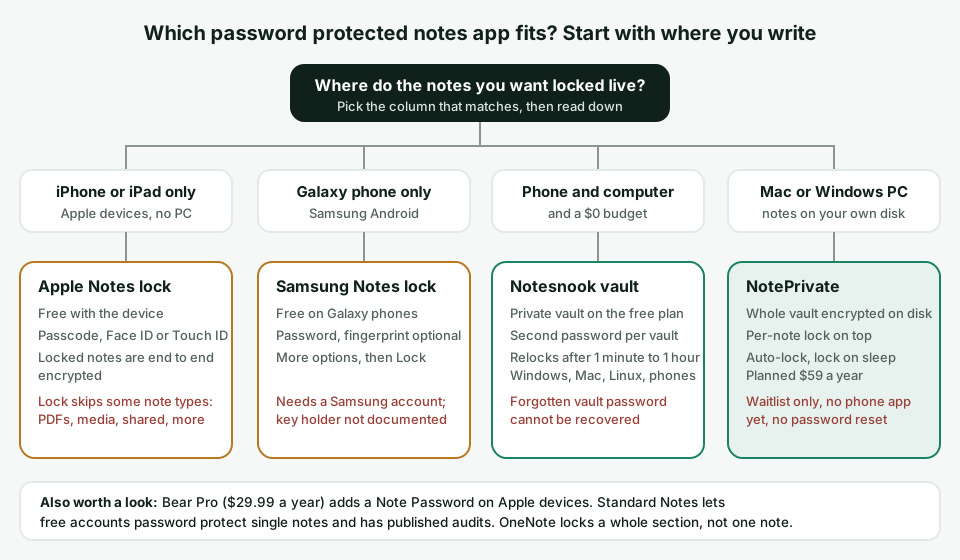
Free with the device. Notes password, Face ID or Touch ID, and Apple says locked notes are end-to-end encrypted. The lock skips some note types, including PDFs, audio, video and shared notes.
Free on Galaxy phones. Open the note, tap More options, then Lock, and a fingerprint can open it. Needs a Samsung account, and Samsung does not document who holds the key.
The private vault is on the free plan, with a second password and a relock time you set from 1 minute to 1 hour, or never. Runs on Windows, Mac, Linux and phones. A forgotten vault password cannot be recovered.
The whole vault is encrypted on your own disk, with a per-note lock on top, auto-lock and lock on sleep. Planned at $59 a year. Waitlist only, no phone app yet and no password reset.
Bear Pro ($29.99 a year) adds a Note Password on Apple devices. Standard Notes lets free accounts password protect single notes and has published audits. OneNote locks a whole section, not one note.
The right password protected notes app mostly depends on the device in your hand. Here is the NotePrivate shortlist per device, with the platform and price facts repeated so each answer stands alone.
Apple Notes locks a note behind Face ID, Touch ID or a notes password at no cost, and Apple says locked notes are end-to-end encrypted. If you need to lock a PDF, a recording or a tagged note, which Apple's lock skips, Notesnook's free private vault on iOS is the better fit. NotePrivate has no iPhone app yet.
On a Galaxy phone, Samsung Notes locks a note for free with a Samsung account. On any other Android phone, Notesnook's private vault is free and end-to-end encrypted, and Standard Notes lets free accounts password protect single notes. Google Keep cannot lock a note. NotePrivate has no Android app.
Windows Notepad and Sticky Notes have no password, and BitLocker stops protecting files once you sign in. NotePrivate keeps the whole vault encrypted on the PC, with an extra lock on single notes, planned at $59 a year. For $0, Notesnook and Standard Notes run on Windows, and OneNote locks a section. The NotePrivate encrypted notes app for Windows page covers BitLocker and Notepad in detail.
NotePrivate if the Mac is where you write and you want the vault encrypted on its disk, with Touch ID so the long password stays in your password manager. Apple Notes lock is the free choice if every device you own is Apple and the notes you lock are plain text and pictures. Bear Pro at $29.99 a year sits between the two.
Notesnook, because its free plan includes the private vault, end-to-end encryption and apps for six platforms. Standard Notes free is the runner up, with single-note password protection on a plain text editor. NotePrivate is not free: it is planned at $59 a year with no free tier.
Only if the paid tier does a job you have. Bear Pro at $29.99 a year buys sync and the Note Password on Apple devices; Standard Notes Productivity at $90 a year buys rich text and folders; NotePrivate at a planned $59 a year buys every note type in an encrypted vault on a Mac or Windows PC. If a free lock covers your notes, keep the money.
A comparison written by one of the apps in it should say where that app loses. These are the readers NotePrivate does not fit today, and what to use instead.
NotePrivate runs on macOS and Windows; the iPhone companion is still in progress and there is no Android app. Use Apple Notes lock on an iPhone, Samsung Notes on a Galaxy phone, or Notesnook's free vault on either.
NotePrivate is planned at $59 a year with no free tier. Notesnook's free plan includes the private vault, and Standard Notes free can password protect single notes.
NotePrivate is closed source with no published third-party audit. Standard Notes publishes its source and lists audits from 2017 to 2022, and Notesnook publishes its client and server code.
It depends on where you write. Notesnook is the best free pick on every device, because its private vault and end-to-end encryption are on the free plan. Apple Notes and Samsung Notes are the locks already on an iPhone or a Galaxy phone. NotePrivate is the pick for a Mac or Windows PC when you want every note encrypted on your own disk, planned at $59 a year and waitlist only.
Open the note, tap More options, the three vertical dots, then tap the Lock icon and follow the prompts to create a password. Samsung's support page says a Samsung account is required to lock notes, and you can change the password later from the Samsung Notes settings. Samsung's community guides add a fingerprint option for opening locked notes.
The one whose password encrypts the notes, not one that only hides the screen. A sign of real encryption is that the company cannot recover a forgotten password: Notesnook says this about its vault, Microsoft says it about OneNote section passwords, Bear says it about a Note Password, and NotePrivate has no reset either. A PIN screen over plain files stops a glance at an open phone and does not protect a backup or a copy.
NotePrivate, if you want every note encrypted on the PC itself with no account, because Windows Notepad and Sticky Notes have no password and BitLocker stops protecting files once you sign in. For $0, Notesnook and Standard Notes both run on Windows and can lock single notes, and OneNote can password protect a whole section.
Yes. Notesnook's free plan includes its private vault, Standard Notes lists password protection for individual notes on its free plan, Apple Notes lock is free on Apple devices, Samsung Notes lock is free on Galaxy devices, and OneNote section passwords cost nothing. NotePrivate is not free: it is planned at $59 a year.
Yes, in Apple Notes. Set a notes password in Settings, then open a note, tap the More button and choose Lock Note, and Face ID or Touch ID can open it after that. Apple's support page says the lock skips notes with tags, PDFs, audio, video or iWork documents, notes synced through IMAP, and shared notes. NotePrivate has no iPhone app yet.
No. A reply on Google's own Keep help community in January 2026 states that locking notes is not a feature in Keep, so your phone's lock screen is the only thing in front of it. Samsung Notes, Notesnook and Standard Notes can all lock a single note on Android.
If the lock is real encryption, the locked notes are gone. Notesnook says it cannot recover a forgotten vault password, Microsoft says not even its support can open a OneNote section without the password, and NotePrivate has no reset link because the password never leaves your device. Store the password in a password manager before you lock anything important.
No. NotePrivate is waitlist only, planned at $59 a year with every feature included, on macOS and Windows. Joining the waitlist is the one thing you can do today.
Comparing on encryption and audits rather than the lock? The NotePrivate secure note taking app comparison runs seven apps through five tests, and the encrypted diary apps with a lock, compared covers dated entries.
NotePrivate keeps your notes in an encrypted vault on your Mac or Windows PC, with a key only you hold and an extra lock for the notes that matter most. It is not on sale yet. Join the waitlist and you will hear the day it opens.
NotePrivate is not on sale yet. Leave your email and we will write to you the day it opens.
 NotePrivate