A private notepad is a place to jot things down that nobody else can read: not the person who borrows your laptop once the vault has locked, not a backup service, not the company that made the app. NotePrivate is a private notepad for Mac and Windows. Every note is encrypted on your machine, the password that opens it never leaves the device, and the app works with the network off.
macOS and Windows · You hold the keys · Planned at $59 a year, waitlist only
A private notepad is a notes app that stores your text so only you can read it. In practice that means two things: the words are encrypted before they are written to a disk or a server, and the key that opens them stays with you rather than with the app maker. The notepads that ship with your devices mostly fail that test. Windows Notepad and TextEdit on a Mac save plain, readable text with no password option, and Google Keep, Google's notepad, has no note lock at all. NotePrivate is a private notepad for Mac and Windows that encrypts every note on your own computer with a master key wrapped by your password, and that password never leaves the machine. It is planned at $59 a year, not on sale yet, and has no Android or iPhone app today, so phone first readers should look at the device picks further down this NotePrivate page.
Named products are market context, not reviews or endorsements. Check each vendor's own site before you commit.
App store listings for private notepad apps lean on a padlock icon. These four checks are what the padlock should mean, and you can run them on any notepad before you trust it with a note.
A PIN screen in front of a notepad stops someone tapping through the app. It does nothing about the file underneath if that file is plain text. NotePrivate encrypts the vault before anything is written, so the file on your Mac or PC is ciphertext whether the app is open or not.
If the notepad maker can reset your password and still show you your notes, the maker can read them. Google says Keep data is encrypted in transit and at rest on its servers, which protects against outsiders, while Google keeps the keys. NotePrivate wraps the master key with your password on your own device, so nobody at NotePrivate can open your notes, and a forgotten password cannot be reset.
A private notepad that has to reach a server to show you a note has already sent something somewhere. NotePrivate keeps the vault on the machine in front of you and opens it offline. Sync, if you want it, runs through a folder you choose, such as iCloud Drive or Dropbox, and what lands there stays encrypted.
Most of a notepad is shopping lists. A few notes are recovery codes or a draft you have not sent. NotePrivate lets you mark a note as protected so it stays closed after the vault is open until your password is entered again, and the NotePrivate guide to a notes app with a password explains how that second lock differs from your login and from disk encryption.
The difference between a notepad and a private notepad is easiest to see in the file itself.
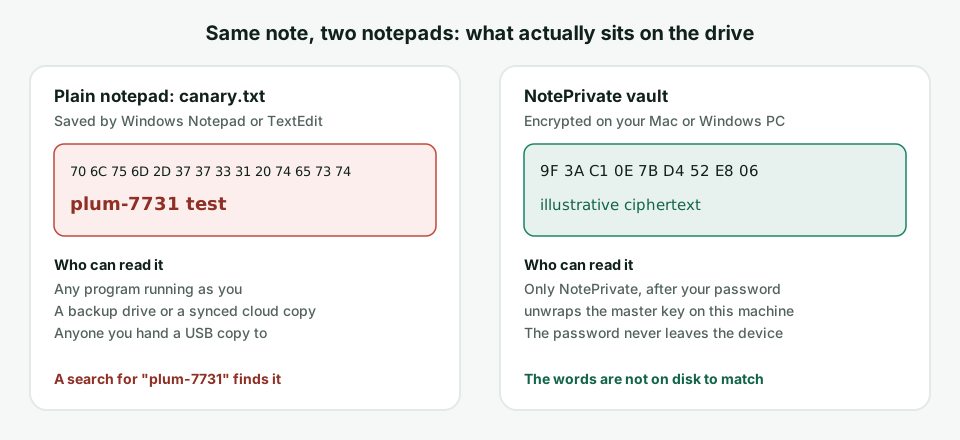
This canary test shows whether the notepad you use today writes your words to disk in the clear. It uses only tools already on a Mac or a Windows PC, and it works the same way on any notes app you can install today. NotePrivate is waitlist only and cannot be downloaded yet, so you cannot run this test on it until it opens.
findstr /s /m "plum-7731" "%USERPROFILE%\Desktop\*.txt". On a Mac, open Terminal and run grep -rl "plum-7731" ~/Desktop. Either command prints the path to canary.txt, which means any program running as you can find and read that note.The search commands are the stock findstr on Windows and grep on macOS. macOS may ask whether Terminal can access your Desktop the first time; that prompt is the operating system, not the notepad.
Most people searching for a private notepad start with the one their device shipped with. Here is how far each one goes, and where NotePrivate takes over on a computer.
No. Windows Notepad has no password field, no lock and no encryption setting, so a note saved there is a readable .txt file. BitLocker encrypts the whole drive while the PC is off, and once you sign in every file, Notepad's included, is open to anything running as you. NotePrivate is the private notepad for that gap on Windows, and the NotePrivate encrypted notepad for Windows page covers the BitLocker, EFS and 7-Zip routes in detail.
TextEdit saves plain or rich text files with no password of their own, so it behaves like Notepad. Apple Notes can lock individual notes with your login password or a custom one, though Apple's own support page lists notes it will not lock, including notes with tags and notes holding a PDF, audio or video. NotePrivate on a Mac encrypts the whole vault rather than the notes you remembered to lock, and the NotePrivate comparison of Apple Notes alternatives walks through what carries over.
Yes. Google's notepad is Google Keep, on Android, iPhone and the web. It has no lock for a note: a reply on Google's own Keep help community in January 2026 states that locking notes is not a feature in Keep. Google's Keep privacy page says data is encrypted in transit and at rest and that Keep does not use your content for advertising, while the notes live on Google's servers under keys Google holds. NotePrivate imports Google Keep notes, so a Keep archive can move onto your own Mac or PC.
On iPhone, yes: Apple Notes can lock a note behind Face ID or a passcode. On Android it depends on the phone. Samsung Notes on Galaxy phones can lock individual notes, while Google Keep cannot. NotePrivate has no phone app yet; an iPhone companion with encrypted iCloud sync is in progress, and there is no Android app.
There is no single best private notepad. There is the one that runs where you write and keeps the key with you. These picks come from the apps that show up when people ask for a private notepad, and NotePrivate is the right answer in only some of them.
NotePrivate keeps one encrypted vault on your own computer that opens on macOS and Windows, with rich text, Markdown, code, checklists and quick spreadsheets in the same private notepad. Planned at $59 a year with no free tier, waitlist only today. The NotePrivate private notes app overview lists every feature.
Notesnook describes itself as an open source, zero knowledge private note taking app. NotePrivate's own check of the Notesnook pricing page on 10 September 2026 found a free plan and apps for Android, iOS, Windows, macOS, Linux and the web. If an Android phone is your notepad, Notesnook fits where NotePrivate does not.
If you already use Signal, Note to Self is a private notepad hiding in plain sight. Signal's support page says it is a chat to send messages to yourself and that all messages in it are end to end encrypted, with disappearing messages available. It is a scratchpad, not a filing system, and NotePrivate is the opposite trade.
Apple Notes is already on the phone and its note lock is a real control, with the exceptions Apple lists for tags, PDFs, audio and video. NotePrivate has no iPhone app yet, so an iPhone only reader should start here.
Both run in a browser tab and both can be used without an account, which suits a single private note on a borrowed computer. The note lives at a URL on someone else's service, and NotePrivate keeps notes on your own disk instead.
The App Store and Google Play both carry small apps called Private Notepad with a PIN screen. Check the listing's privacy section before typing anything into one: the App Store page for one app called Private Notepad with password, fetched by NotePrivate on 22 October 2026, carries a "Data Used to Track You" section. A PIN is a door; it does not say the note is encrypted.
Named products are market context, not endorsements or reviews. Features, prices and platforms change; check each vendor's site before you commit. For a side by side on encryption and price, the NotePrivate secure note taking app comparison covers Standard Notes, Notesnook, Joplin, Apple Notes, Obsidian and Evernote.
It depends on what you would otherwise use. If a free private notepad already runs on your devices and keeps the key with you, as Notesnook's free plan and Signal's Note to Self do, paying adds little. NotePrivate earns its planned $59 a year in a narrower case: you write on a Mac or a Windows PC, you want the notes on your own disk rather than on a service, and you want more than plain text, since NotePrivate holds rich text, code, checklists, spreadsheets and one-time codes in the same encrypted vault. There is no free tier, so if price decides it, start with a free option.
NotePrivate runs on macOS and Windows only today. The iPhone companion is in progress and there is no Android app, so a phone first writer is better served by Notesnook, Apple Notes locked notes or Signal Note to Self.
NotePrivate's password wraps the master key and never leaves your device, so nobody can reset it for you. If you need an account recovery email, you need a hosted notepad, and the host can read what it can recover.
NotePrivate handles journal entries as notes, and the NotePrivate private journal and diary app page shows that daily workflow, if dated entries are what you actually keep.
A private notepad is a notes app that stores what you type so only you can read it, which means the notes are encrypted before they reach a disk or a server and the key stays with you. NotePrivate is a private notepad for Mac and Windows that encrypts every note on your own computer with a key wrapped by your password.
No. Windows Notepad has no password, lock or encryption option, so it saves readable text files. You can encrypt the drive with BitLocker or put the file in a password protected archive, or use a private notepad such as NotePrivate, which encrypts every note inside its own vault on your PC.
Yes. Google Keep is Google's notepad, on Android, iPhone and the web. It has no lock for individual notes, and the notes are stored on Google's servers under keys Google holds. NotePrivate can import Google Keep notes onto your own Mac or PC.
Apple Notes can lock individual notes on iPhone, iPad and Mac with a device passcode, login password or custom password, though Apple lists notes it will not lock, such as notes with tags or attached PDFs, audio or video. NotePrivate encrypts every note in the vault by default and adds a second lock on the notes you mark as protected.
NotePrivate does not run on Android, so it is not the answer there. Notesnook lists an Android app and a free plan and describes itself as a zero knowledge private note taking app, and Signal's Note to Self keeps quick notes end to end encrypted on any phone that runs Signal.
No. NotePrivate is planned at $59 a year with every feature included and no free tier, and it is not on sale yet. Join the waitlist to hear when it opens.
Yes. The NotePrivate vault lives on your Mac or Windows PC and opens with the network off. Sync between machines is optional and runs through a folder you choose, where the vault stays encrypted.
NotePrivate keeps every note encrypted on your own Mac or PC. Waitlist only, planned at $59 a year.
NotePrivate is not on sale yet. Leave your email and we will write to you the day it opens.
 NotePrivate