NotePrivate / Secret notes app
A secret notes app keeps a note secret in one of three ways: it hides the app, it puts a PIN in front of the app, or it encrypts the notes with a key only you hold. Only the third still works when someone copies the files or a backup. On a phone, Apple Notes locked notes and the free Notesnook vault encrypt the note; on a Mac or Windows PC, NotePrivate keeps every note encrypted on your own disk. Two of the apps that rank on Google Play for secret notes app say less about encryption than their names suggest, and NotePrivate read both listings so you do not have to.
Listings and vendor pages read 26 October to 4 November 2026 · Named products are market context, not endorsements
Every secret notes app keeps a note secret from someone. NotePrivate drew this chart to show which someone, because a hidden icon, a PIN screen and encryption stop different people.
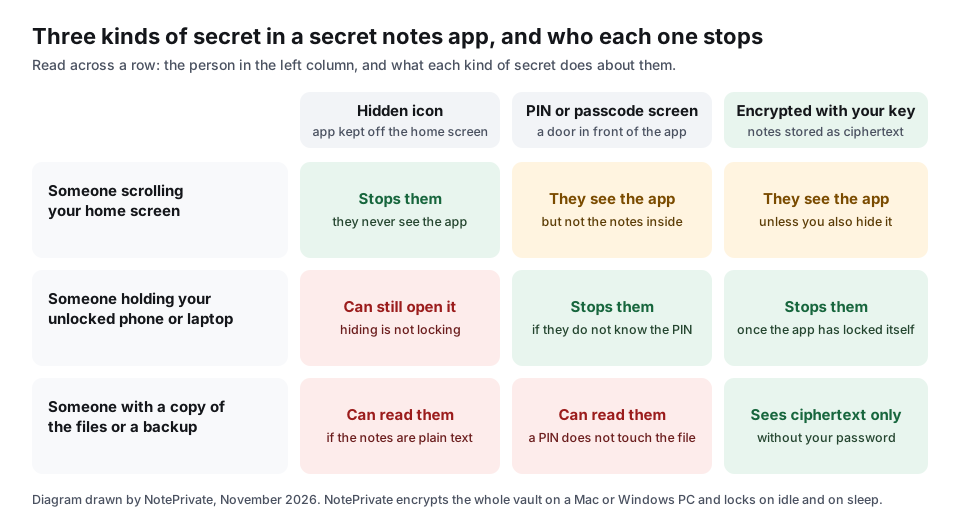
A hidden secret notes app keeps the app itself off the screen, so a person scrolling your phone never learns there is anything to look for. Samsung's Secure Folder is the best documented example: Samsung's support page, updated 14 May 2026, says you can turn off Add Secure Folder to Apps screen so the icon disappears from the home and apps screens, and that the folder can still be opened from Settings or the Quick Panel. Hiding alone answers who knows the notes exist, not who can read them, so pair it with a lock or encryption. NotePrivate does not hide its icon; it encrypts instead.
A PIN or passcode screen stops the person holding your open phone from tapping into the app. If the notes underneath are stored as plain text, a backup, a synced copy or anyone who can read the app's files still sees every word, because the PIN never touched the file. Ask the developer how stored notes are encrypted: Google Play's Data safety encryption field only covers data in transit. NotePrivate also asks for a password, but the password unwraps the key rather than opening a door.
An encrypted secret notes app stores the notes as ciphertext and derives the key from a password only you know. The tell is in the vendor's help pages: Apple says it has no access to locked notes and cannot help you open them if you forget the notes password, and Notesnook says it cannot recover a forgotten vault password. NotePrivate works the same way on a Mac or Windows PC: the vault password wraps the master key, never leaves the machine, and cannot be reset by anyone.
Two Android apps named Secret Notes sit in the top results for secret notes app. NotePrivate recorded what each Google Play listing says about itself, because the store listing is all most people read before they type a password into one.
| Google Play listing | Downloads | Rating | Ads and purchases | Data safety says | Last updated |
|---|---|---|---|---|---|
| Secret Notes, by RavzaSoft | 100K+ | 4.5 stars from 5.46K reviews | Contains ads | Data isn't encryptedTransit declaration only; storage encryption unknown. Data can't be deleted; may share app info, performance data and device IDs with third parties | 11 September 2019 |
| Secret Note, Private Diary, by Dalmuri | 10K+ | 4.6 stars | Contains ads; in-app purchases | Data is encrypted in transitYou can request deletion; may share personal info, app info, performance data and device IDs with third parties | 20 October 2026 |
Sources: the RavzaSoft Google Play listing and the Dalmuri Google Play listing, recorded on 4 November 2026; both ratings checked again on 10 November 2026. Google's Data safety guidance says its encryption field concerns data in transit. These are developer declarations, not tests of stored notes. Read the current listing and ask how notes are stored before you install.
RavzaSoft's Secret Notes has 100K+ downloads and a 4.5 star rating, and its description pitches it for bank accounts, email accounts and passwords. Its Data safety section says "Data isn't encrypted" and "Data can't be deleted"; Google says that encryption field concerns data in transit, so it does not establish whether the notes are encrypted on the device. The description says the network permission is for ads and that the passcode can be restored with a secret question. The listing was last updated on 11 September 2019. The rating does not establish how the notes are stored. NotePrivate has no Android app, so on Android the free Notesnook vault is the closer fit.
Dalmuri's Secret Note app, listed as Secret Note, Private Diary, promises "Military-grade encryption" in its description, local backup and a custom password. Its Data safety section, which is the developer's formal answer to Google, says data is encrypted in transit and that personal info, app info and device IDs may be shared with third parties. The description and the safety form answer different questions, so ask the developer what encrypts the notes at rest before you trust it with anything that matters. NotePrivate cannot answer for either app; it can only tell you what the listings say.
You can run this check on any secret notes app before you install it. NotePrivate checked the RavzaSoft Secret Notes listing on 4 November 2026 and checked its current rating again on 10 November 2026.
The same five steps work on the App Store, where the privacy section is called App Privacy. NotePrivate is waitlist only and is not in either store, so you cannot run this check on it yet.
The best secret notes app is the one that runs where you write and encrypts the note rather than hiding it. Here is the NotePrivate shortlist per device, with the facts repeated so each answer stands on its own.
Apple Notes locks a note with your iPhone passcode or a separate notes password, and Apple's support page says both keep locked notes end-to-end encrypted for iCloud accounts. It costs nothing. Apple's page also lists what it will not lock: notes with tags, PDFs, audio, video, Keynote, Pages or Numbers documents, notes synced through IMAP, and shared notes. NotePrivate has no iPhone app yet.
Samsung's Secure Folder is protected by the Samsung Knox platform, which Samsung says encrypts all data stored there, behind its own passcode or biometric lock, and its icon can be hidden. You can add apps to it, so a copy of a notes app can live inside it. Setting it up needs a Samsung account. NotePrivate has no Android app.
Notesnook's private vault puts a second password on the notes you choose, and NotePrivate's check of Notesnook's pages on 26 October 2026 found the vault on the free plan, apps for Android, iOS, Windows, macOS, Linux and the web, and paid plans from $19.99 a year. Notesnook says it cannot recover a forgotten vault password.
NotePrivate keeps every note in an encrypted vault on your own computer, wraps the master key with your password, and lets you mark a note so it asks for that password again even with the vault open. It locks on idle and on sleep, supports Touch ID on Mac, works offline and needs no account. Planned at $59 a year, waitlist only. The NotePrivate encrypted notes app for Windows page covers why Notepad and BitLocker do not do this job on a PC.
If Signal is already on your phone, Note to Self is a chat with yourself, and Signal's support page says every message in it is end to end encrypted. Users on the GrapheneOS forum thread that ranks for this search mention it for exactly that job. It is a scratchpad, not a filing system, which is the opposite trade from NotePrivate.
The GrapheneOS forum thread that ranks for secret notes app names Standard Notes, Joplin, Notesnook, Signal Note to Self and Bitwarden's encrypted notes. One reply warns that Simple Mobile Tools was bought by an adware company and points to Fossify, a fork by one of its developers. NotePrivate is not in that thread, because it does not run on Android.
Named products are market context, not endorsements or reviews. For eight apps compared on what each lock covers and what it costs, see the NotePrivate password protected notes apps ranked by what the lock covers.
A paid secret notes app is worth it only when the free ones do not run where you write. On an iPhone, the Apple Notes lock is free and encrypted. On any phone, Notesnook's free vault is encrypted and its paid plans start at $19.99 a year. The ad-supported Secret Notes apps on Google Play cost nothing up front, but their Data safety transit declarations do not establish whether they encrypt stored notes. NotePrivate's planned $59 a year may fit when your secret notes sit on a Mac or Windows PC, you want the whole library encrypted on your own disk, and you want rich text, checklists, code and spreadsheets in the same vault. It is waitlist only. If you keep a dated diary, the NotePrivate secret diary app for Mac and Windows shows that workflow.
NotePrivate wrote this secret notes app page. The app is waitlist only, and these are cases where another option fits better.
NotePrivate runs on macOS and Windows only; the iPhone companion is still in progress and there is no Android app. Use Apple Notes lock on an iPhone, Secure Folder on a Galaxy phone, or Notesnook's free vault on either.
NotePrivate is planned at $59 a year with no free tier. Notesnook's free plan includes the private vault, and the Apple Notes lock is free on Apple devices.
NotePrivate has no reset, because the password never leaves your device. If you need recovery, a hosted notes app with account recovery fits better, and that host can read what it can recover.
A secret notes app is a notes app that keeps what you write away from other people, by hiding the app, putting a PIN in front of it, or encrypting the notes with a key only you hold. Only encryption still protects the notes when someone copies the files or a backup. NotePrivate is a secret notes app for Mac and Windows that encrypts every note on your own disk.
Yes. On a Samsung Galaxy phone, Secure Folder encrypts what you put in it and can hide its own icon from the home and apps screens. On an iPhone, Apple Notes locks individual notes instead of hiding the app. NotePrivate does not hide its icon; it encrypts the whole vault on a Mac or Windows PC.
On a Galaxy phone with a hidden Secure Folder, open it from Settings, Security and privacy, More security settings, Secure Folder, or from the Quick Panel. On an iPhone, tap the locked note, tap View Note and enter your notes password or use Face ID or Touch ID. In NotePrivate, open the vault with your password and enter it again for a protected note.
It depends on the device. Apple Notes lock is the free encrypted choice on an iPhone, Notesnook's free private vault works on Android, iPhone and computers, and NotePrivate is the pick for a Mac or Windows PC when you want every note encrypted on your own disk, planned at $59 a year and waitlist only.
Apple Notes with locked notes, for most people. It is free, and Apple says locked notes are end-to-end encrypted for iCloud accounts. It will not lock notes with tags, PDFs, audio, video, iWork documents, IMAP sync or sharing, and for those Notesnook's free vault on iOS fits better. NotePrivate has no iPhone app yet.
Read the Data safety section and ask the developer how notes are stored. RavzaSoft's Secret Notes listing says "Data isn't encrypted"; Dalmuri's says data is encrypted in transit. Google says this field describes transit encryption. Neither declaration establishes whether notes stored on your device are encrypted. A PIN screen alone cannot protect notes stored as plain text.
Yes. NotePrivate keeps every note in an encrypted vault on your Mac or Windows PC, with a password that never leaves the machine and an extra lock on single notes. Windows Notepad has no password at all, and Apple Notes on a Mac locks single notes with the same exceptions as on an iPhone.
If the app really encrypts, the locked notes are gone. Apple says it cannot help you open locked notes without the notes password, Notesnook says it cannot recover a forgotten vault password, and NotePrivate has no reset because the password never leaves your device. An app that can restore access with a secret question is letting something other than your password open the notes.
No. NotePrivate is waitlist only, planned at $59 a year with every feature included, on macOS and Windows. Joining the waitlist is the one thing you can do today.
Comparing secret notes apps on audits and encryption rather than hiding? The NotePrivate secure note taking apps compared on who can read your notes runs seven apps through five tests, and the private notepad picks for each device include a canary test you can run on any notes app on a computer.
NotePrivate keeps every note encrypted on your Mac or Windows PC, with a key only you hold and an extra lock for the notes that matter most. It is not on sale yet. Join the waitlist and you will hear the day it opens.
NotePrivate is not on sale yet. Leave your email and we will write to you the day it opens.
 NotePrivate